


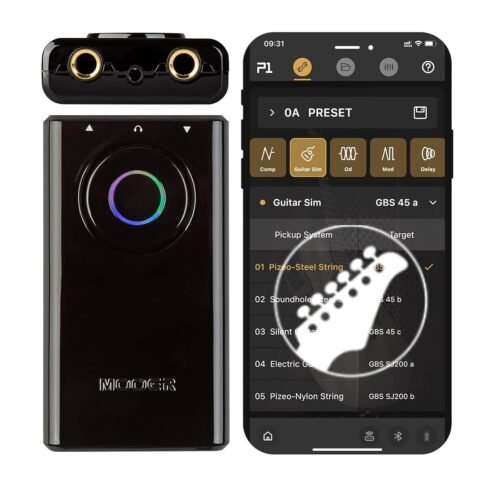






Your whole practice rig in your pocket – no amp, no power cable. The Mooer Prime P1 is a tiny intelligent effects unit that plugs straight into your guitar. Put on headphones, pick a tone with one knob and play – at home, while travelling or backstage. Edit everything in the Prime app on your phone.
Why customers choose it
Who it is for
Beginners and students who practise with headphones, hostel and flat dwellers who need silent practice, travelling guitarists, bass players, and anyone who wants quick phone recording of guitar ideas.
What’s in the box
- Mooer Prime P1
- USB cable
- Quick guide
Specifications
| Type | Intelligent pocket multi-effects with amp modelling |
|---|---|
| Effects | 126 built-in (guitar); 73 bass effects, 10 bass amp models |
| Presets on unit | 4 (A/B/C/D) |
| Practice tools | Tuner, 10 metronomes, 40 drum patterns, 80 s looper |
| Connections | Input jack, output jack, headphone out, USB-C |
| Bluetooth | Audio playback + app control |
| USB | USB-C for charging and OTG audio |
| Charging | 5V 1A, about 2.5 hours |
| Input jack | Rotates up to 270 degrees |
| Dimensions | 83 x 42 x 31 mm |
| Weight | 59 g |
| Looper | 80 seconds |
| Drum Machine | 40 patterns + 10 metronomes |
| USB | USB-C charging and OTG audio |
Good to know
- Needs the Mooer Prime app (iOS and Android) to edit tones and use the tuner, drums, metronome and looper.
- Charge from a phone charger, power bank or computer USB port using a USB-C to USB-A cable.
- Works with Mooer F-series wireless footswitches (sold separately) for preset switching and looper/drum control.
- Mooer says support for acoustic and other instruments comes with firmware updates.
FAQ
Do I need an amplifier?
No. Use headphones on the headphone output, or connect the output to an amp or speaker if you want.
Can I record to my phone?
Yes. The USB-C port supports OTG recording with a phone or tablet.





 Talk to Suhavi
Reviews
There are no reviews yet.